


Skinning Ad

Digital

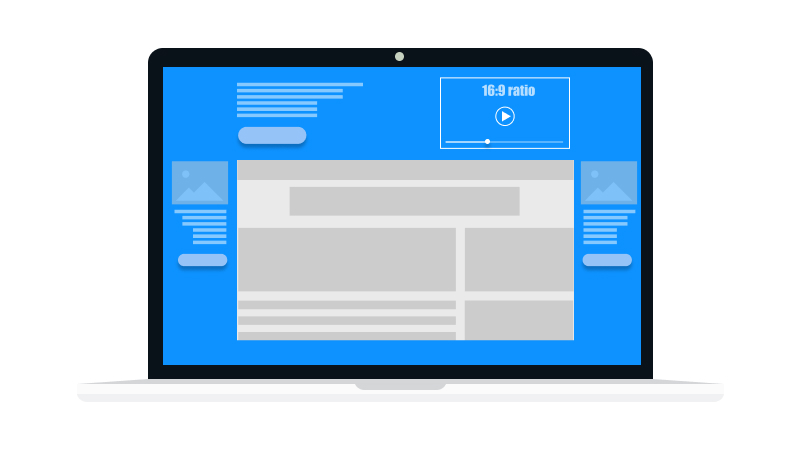
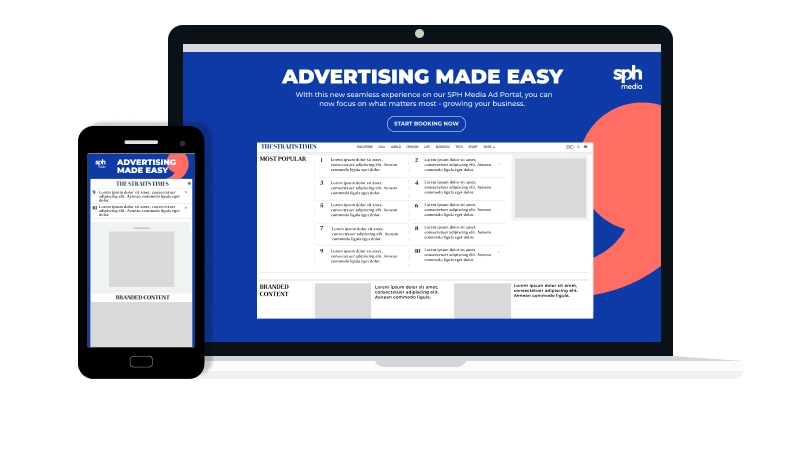
A Skinning ad surrounds the content on a page, ensuring that your brand receives maximum exposure when a user is browsing the page.

Ad Type
High Impact, Video

Ad Specifications

Last updated Sep 2024

Desktop

Image Only Specifications

Image

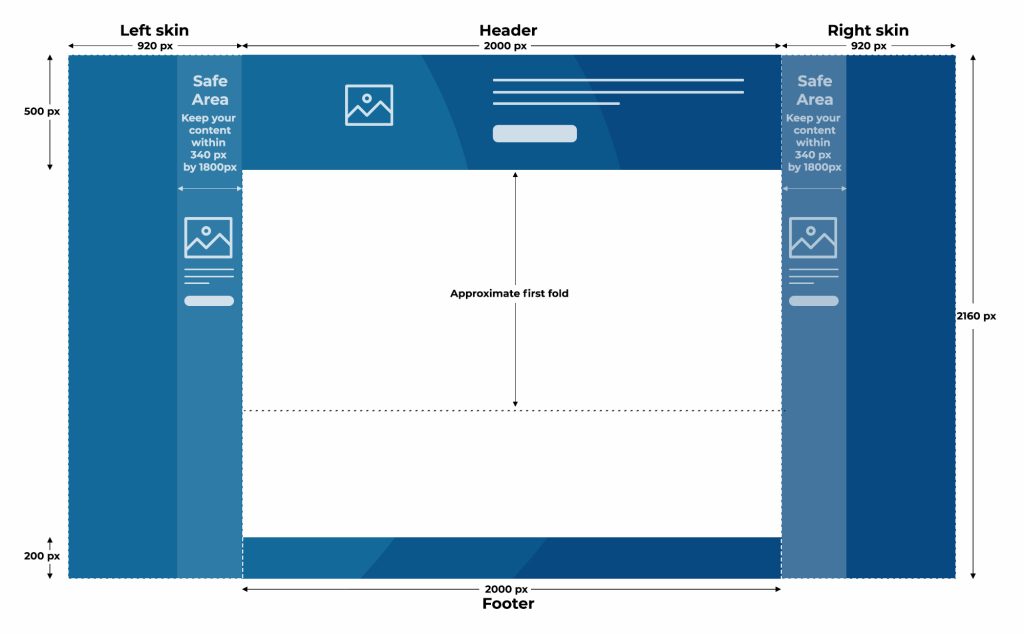
Dimensions (W x H)Area specs: (refer to skinning illustrations)
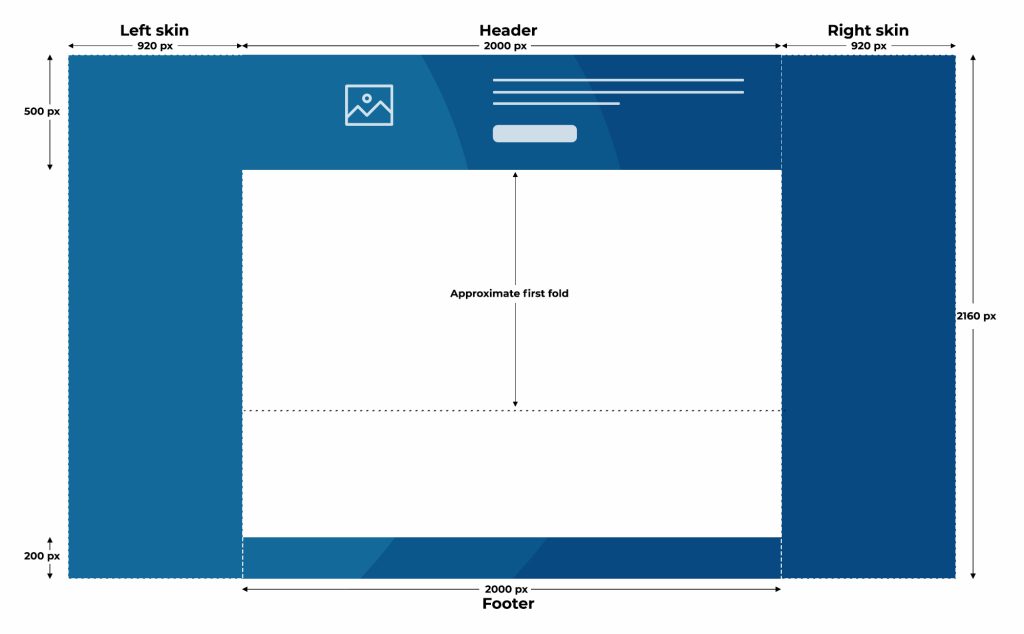
- Header – 2000 x 500 px
- Left skin – 920 x 2160 px
- Right skin – 920 x 2160 px
- Footer – 2000 x 200 px
Maximum File SizeUp to 600KB
File TypeJPG, PNG or GIF
Other Requirements- Provide 2 sets of creatives to cater for both large and small screens
- Refer to skinning illustrations below for more information on creative dimensions

Creative #1: Skinning for Large Screens

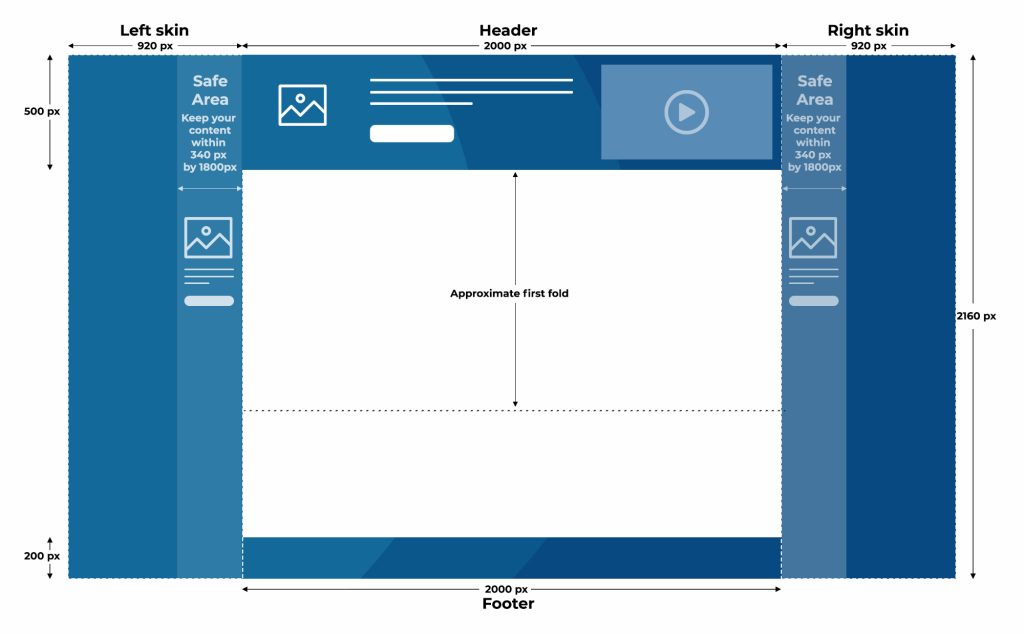
Creative #2: Skinning for Small Screens

Note: This applies to scenarios with smaller screen resolutions and wider site widths, where limited space is available on the left and right sides for the skinning to display effectively.

Image with Video Specifications

Image

Dimensions (W x H)Area specs: (refer to guidelines)
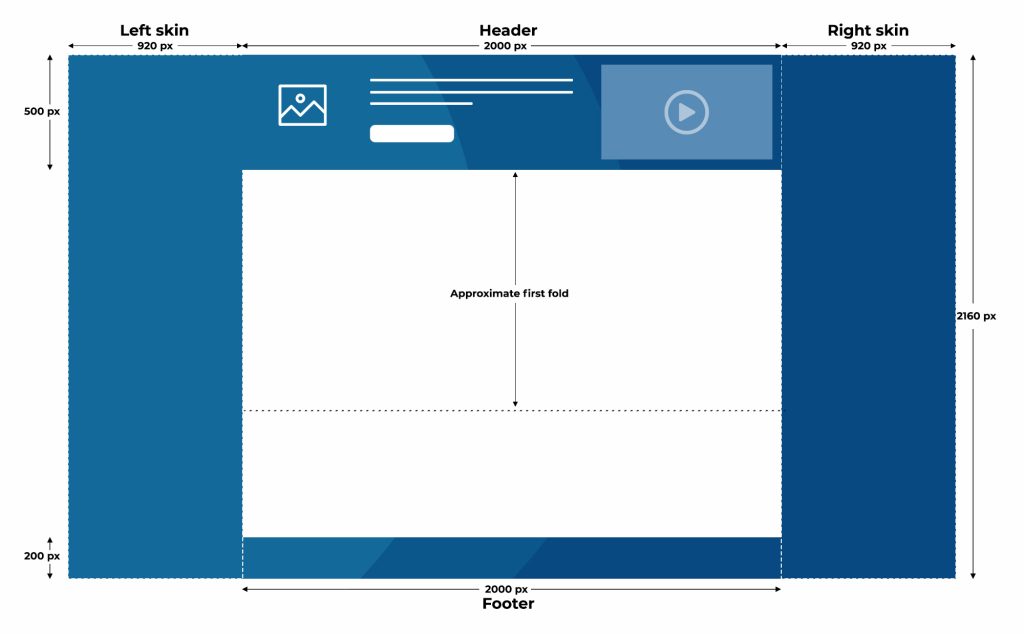
- Header – 2000 x 500 px
- Left skin – 920 x 2160 px
- Right skin – 920 x 2160 px
- Footer – 2000 x 200 px
File TypeJPG, PNG or GIF
Maximum File SizeUp to 600KB
Image Requirements- Provide 2 sets of creatives to cater for both large and small screens
- Refer to diagrams below for more information on dimensions

Video

Video RequirementAspect ratio: 16:9
Muted by default

(YouTube embedded is not allowed)
Maximum File Size2MB
Maximum Duration30 secs
File TypeMP4 (H.264 codec)

Creative #1: Skinning for Large Screens

Creative #2: Skinning for Small Screens

Note: This applies to scenarios with smaller screen resolutions and wider site widths, where limited space is available on the left and right sides for the skinning to display effectively.
Mobile Web

Image Only Specifications

Image

Dimensions (W x H)Area Specs: (refer to skinning illustrations)
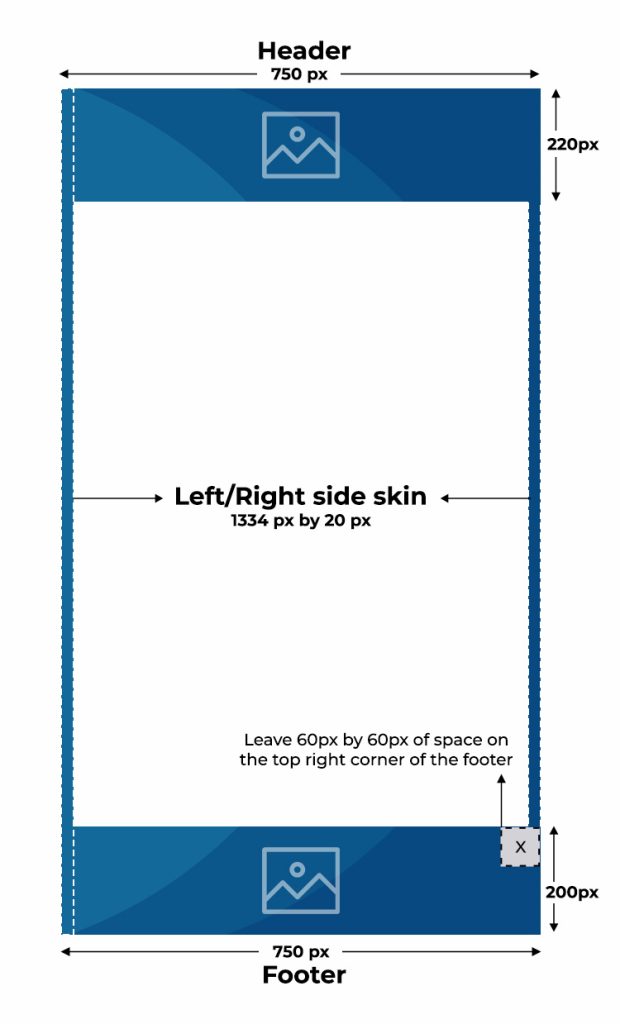
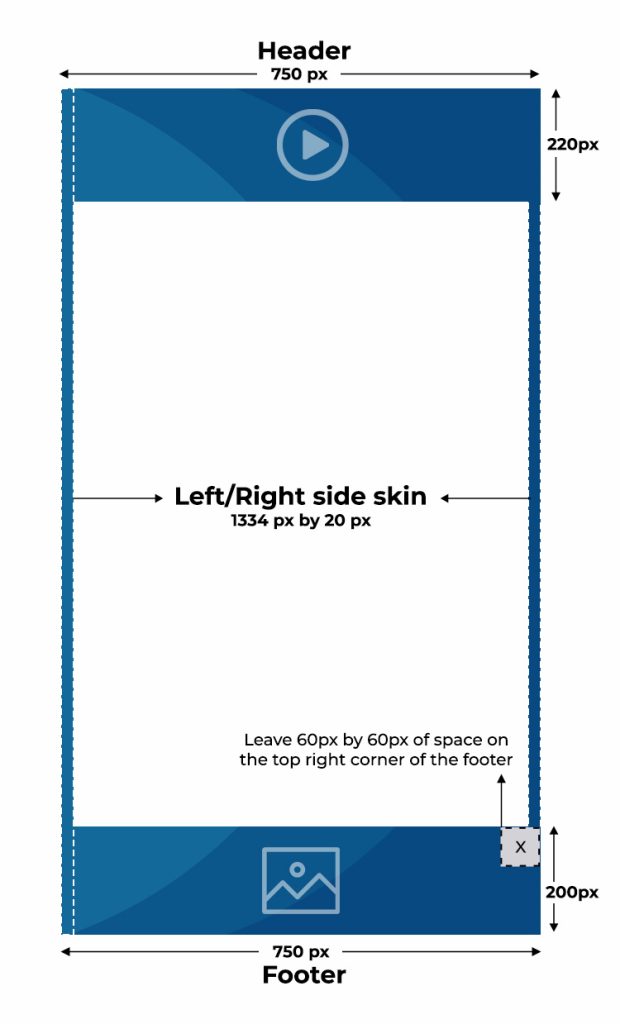
- Header – 750 x 220 px
- Left side skin – 20 x 1334 px
- Right side skin – 20 x 1334 px
- Footer – 750px 200px
Maximum File Size500 KB
File TypeJPG, PNG or GIF
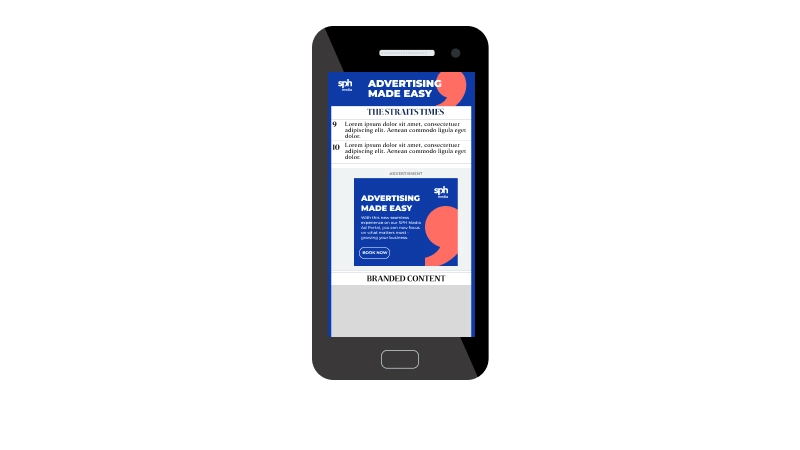
Other Requirements- Leave 60 px of space on the top right corner of the footer page

Skinning (Mobile Web) - Image Only

Image with Video Specifications

Image

Dimensions (W x H)Area Specs: (refer to skinning illustrations)
- Header – 750 x 220 px
- Left side skin – 20 x 1334 px
- Right side skin – 20 x 1334 px
- Footer – 750px 200px
Maximum File Size500 KB
File TypeJPG, PNG or GIF
Other RequirementsLeave 60 px of space on the top right corner of the footer page

Video

Video RequirementAspect ratio: 16:9
Muted by default

(YouTube embedded is not allowed)
Maximum File Size2MB
Maximum Duration30 secs
File TypeMP4 (H.264 codec)

Skinning (Mobile Web) - Image with Video

Things to note:

  1. Browser compatibility for the ad:

    The ad format is optimized for modern browsers, including:
    - Chrome 100
    - Firefox 99+
    - Safari 15+
    - Microsoft Edge 100+

    - Older browser versions may experience limited functionality or visual differences.
    - Ad rendering and behaviour may vary depending on browser version, operating system, device model, viewport resolution, zoom settings, and publisher site environment.
    - When the site width changes (e.g. from 1000px to 1230px and above), the skin format expands outward. On smaller screens, this can make parts of the skin less visible. Depending on the user’s viewport, screen resolution, and content width, the side elements of the skin may be partially cut off.   
  2. Provide 1 click-through URL.
  3. Third-party tags are not allowed. Only 1 impression tracker and 1 click tracker will be permitted for a single set of creative materials.
  4. Please note that mobile skinning ad is only compatible with mobile web.
  5. The video will autoplay in mute by default. The user has to initiate turning the sound on.

Submission Deadline

Production of creative done by client

  • Submit ad creatives for scheduling at least 5 working days prior to the campaign launch
  • Submit ad creative per specification for scheduling at least 5 working days prior to the launch of the campaign.
  • If necessary, provide the ad creative source files in PSD or AI layered files including fonts or images and MP4 for video.
  • There will be a maximum limit of 3 creatives per campaign. The cost for the first creative will be absorbed by SPH Media while the remaining two creatives are subject to adaptation cost.

Production of creative done by SPH Media

  • Client will provide a brief and requirements, afterwhich a quote and lead time will be provided.
  • A minimum of 10 working days is required, subject to the scope of the requirements.
  • Provide the ad creative source files in PSD or AI layered files including fonts or images and MP4 for video.
  • SPH Media will allow up to 3 rounds of changes. Final changes need to be confirmed no later than 3 working days prior to the campaign launch.
  • There will be a maximum limit of 3 creatives per campaign. These are subject to adaptation and production fees.
  • T&C apply

For more information: Advertising Terms and Conditions & Guidelines

Brands Available

News Publications

Lifestyle Publications

Stay updated with the latest news and events with our monthly newsletter

Explore Further

Advertising Solutions
Connect your brand with the right audiences through our multichannel platforms. Leverage our advertising solutions to achieve your business goals.
Advertising Terms & Conditions
SPH Media Advertising Terms & Conditions and Guidelines are available for your reference. Please click to read more.
Ad Booking Portals
Book your classifieds, obituaries, acknowledgement and condolence ads with ease through SPH Media’s self-booking platforms.